Note: This post has been updated with fresh examples including our most seen post ever.
Over the last week I’ve been putting a renewed effort into working with Facebook after listening to a session by Amy Porterfield at our ProBlogger Training Event last week.
While our Digital Photography School Facebook Page is something that I update every day with new posts (and it does pretty decently with engagement and driving traffic). Based on some of Amy’s teaching (you can hear them in the virtual ticket) I decided to mix things up and this week I’ve experimented with a few new types of status updates on the page.
Aside: much of what I actioned I already knew I should be doing (or that I’d done once or twice before)… but wasn’t actually actioning regularly. Isn’t that always the way?!
Here are some of the things I’ve experimented with this week:
Image Posts
I’ve long known that images are GOLD on Facebook and have played around with status updates that are a great image from a blog post and a link in the image description. However, truth be told, I get lazy at times and fall into the trap of just adding a link into the status update area and let Facebook pull in an image automatically from the post.
This week I decided to pull my finger out and stop with the laziness and play with a couple of types of image updates. In doing so I realised that the ‘good’ results we’d been getting previously with Facebook pulling in small images from our post meant that we were well and truly under performing.
Single Image Updates

Here’s an example of one of these. I chose a visually striking image from this blog post and uploaded the photo to Facebook. I then added a description of the image and a call to action to read the post.
The post got a higher than normal number of likes and shares and drove some really decent traffic to the site.
Collages
I’ve never done ‘collage’ based image updates on Facebook before so this was a very new experiment for me. I’m glad I did it. I used a free web based app called Pic Monkey to create these collages which were a collection of images from blog posts. Here are some examples:
 This status update
 was our most popular this week. It was a collage of 16 images that came from
this blog post from our archives. This was a popular post that I knew had done well on Facebook last year so I thought it might be a good one to experiment with. You can see it received over 850 likes, 502 shares and had quite a few comments. It ‘reached’ over 80,000 people.

I was a little surprised by the above collage update. It was a collection of images from this blog post but I almost didn’t publish it as it wasn’t the most visually appealing collage. The post was quite technical and contained diagrams but no stunning photos. However, you can see that the update also did quite well with loads of likes and shares and driving a lot of traffic.

This collage was simply an image and a diagram that showed how the image was lit. In some ways the image actually was a ‘how to’ in and of itself and people didn’t need to click the link in the image description to put the tip into place – but they did click!
I experimented with a variety of other types of collages and they all did well. See a couple more examples here and here.
Albums
I’ve used this strategy in the past to great effect. Instead of uploading a single image or pulling multiple images from a post together into a collage, I upload multiple images into their own ‘album’.
You can see an example of one of these albums here (I literally uploaded this a few minutes ago but it’s already getting lots of likes) – it is just 6 images from a larger image collection post on my blog.

Interestingly you not only get people liking, commenting and sharing the whole albumin, you also get engagement on the individual photos in the album.
See other examples of albums that I’ve created in the past here and here.
Interaction Updates
Another style of update that I’ve always done because it gets a lot of comments and engagement is where I ask a simple question.

By asking followers what they took photos of we not only get lots of comments but many of those who respond actually upload photos for us to see too. That simple actions gets followers looking at each others photos and commenting/liking upon each others comments (true engagement).
Link Updates
While I’ve tried this week to use ‘image’ updates more than I had previously I am still sharing a few ‘link’ based updates as well.
Facebook have recently changed the way that they display these so that now if you have a large image in the post you’re linking to Facebook displays a larger wider version of that image in the update, making it more visually appealing. Here’s an example of one of these.

While the engagement on this type of post isn’t as high I have noticed since Facebook made the change, we’re getting a bit more traffic from these updates as well as a higher number of ‘likes’.
The one tip I’d give on these types of updates is that rather than just pasting in your link and letting Facebook choose what text to display add in an introduction and call to action to read the post.
The Impact of this Weeks Experiments
It’s always a little tricky to tell exactly what impact these experiments have as Facebook made other changes in the last few weeks that will have had an impact too. However, we’ve definitely seen an upswing in engagement this past 10 days.
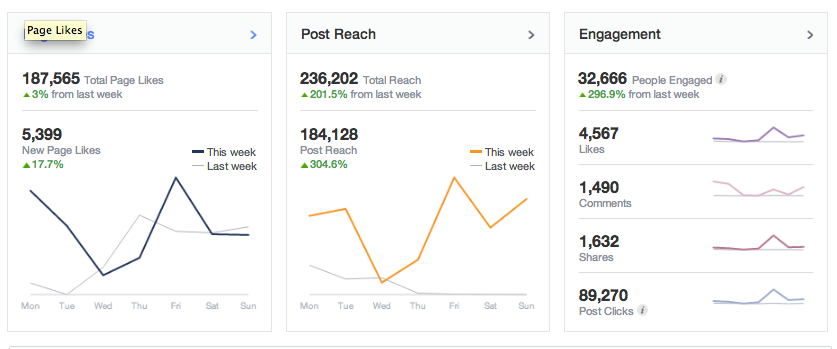
Here’s Facebook’s summary of our last week (click to enlarge):

Page likes were up 17.7% on last week, total reach was up by over 200%, post reach up by over 300% and engagement up to just under 300%. Considering that the page was already travelling pretty well – I’m over the moon to see these initial results from these experiments.
Here’s a chart of our page’s ‘likes’ in the last few months:

Where a few weeks ago we were seeing a steady 100-300 likes per day this past week we’ve seen that rise to 700-1000 per day.
Similarly the stats are pretty clearly on the rise in terms of likes, comments and shares on posts this past week:

As has been ‘total reach’:

And the traffic to my blog has seen some improvement (although not the same spikes as we see on the above charts).

Lastly, here is a screenshot of the last few days stats on each status update that we’ve done (click to enlarge). You can see in it most of the examples I’ve given above to show you how well they did with ‘reach’ and ‘engagement’.

UPDATE
Since publishing this post we’ve seen a result on a status update that has us shaking our head – our most seen update ever. It has been seen by over 135,000 people, liked 2100+ times, received 180+ comments and shared 805 times in the last 8 hours.
Here it is:

The update was based upon images in this post on the blog (which was a popular post that we published several years ago).
I think the update has been so successful for a few reasons:
- Collage Image – as outlined above – collages have been doing well for us. This one has the added benefit of being pretty much self contained and the image is a ‘how to’ by itself without anyone having to go view the post (although they’ve been visiting in great numbers). I do find that these kind of ‘how to’ or illustrative images do well not only on Facebook but also sites like Pinterest.
- Humour – the original post on the blog was quite funny with the author making fun of her bottom being shown in image #2. This has certainly been a feature of some of the comments left on the post. Humor works!
- Question – when I scheduled this status update I formatted the description of the image as a question. In fact I asked it twice. ‘Do You Know these 6 Techniques to Reduce Camera Shake?’ and ‘Which do you use?’ People are wired to answer questions – hence the high comment numbers. Effectively I’m combining the ‘image’ strategy’ and the ‘interaction’ strategies mentioned above.
- Engagement has been high on the page this past week. I suspect one underlying factor is that we’ve been seeing good engagement on the page this past week due to the above experiments. When you get engagement people are more likely to see your new posts – so anyone who has liked/commented/shared this past week is likely to have seen this post.
Originally at: Blog Tips at ProBlogger
![Build a Better Blog in 31 Days]()
How I Increased Facebook Reach and Engagement by 200-300% This Week