Ads 468x60px

10 Tools Bloggers Can Use For Promotion on Social Media - DailyBlogTips

10 Tools Bloggers Can Use For Promotion on Social Media - DailyBlogTips


10 Tools Bloggers Can Use For Promotion on Social Media

Posted: 16 Aug 2015 09:44 PM PDT

Whether you are an individual or a company, social media channels are worth giving a go. They say you have to be where you customers are—and that is definitely social media for most people who own a smartphone. According to Techcrunch, 80% of all online adults now own a smartphone.

Social media provides a unique link to customers that were never there before. Easy, in-expense, personal, and direct communication, this channel is an all-in-one package of pros and few, if any, cons. It also enables your "wooed" customers to market your brand without even asking them to. Making use of all of these benefits, however, requires dedication and hard work to "up-keep" company social accounts.

Below is a list of ten tools that will help you up-keep your social media accounts and do much more.

HootSuite

Add as many social media accounts as you like to your dashboard and manage them all at one place. More than ten million people are currently using Hootsuite, which makes it a worldwide and highly popular tool. Your Hootsuite Dashboard will allow you to manage all of your social networks, monitor your mentions, engage your audience, schedule messages to be delivered, and measure ROI. The PRO version, which has a 30-day free trial, will allow you to manage up to 100 social profiles, comes up with 10 enhanced analytics report, and has up to 10 team managers accessing it all.

IFTTT

IFTTT is a powerful tool that gives you control over your social media accounts, apps, and more. This is basically an "internet automation tool" that automates your actions as per your "recipes". Recipes are a given set of instruction to IFTTT. For example, you could ask the software to post any Instagram photos or videos you liked on your Tumblr. Or you could ask it to save your Facebook status updates to your Evernote. For a social media manager, it might be useful to enable the recipe that allows you to respond to a follower immediately after a "re-tweet". The possibilities are endless!

Buffer

Buffer allows you to "simplify your social routine" by scheduling posts on your social media accounts. This social media tool is a clever way to generate and automate content among all channels. You don't have to worry about opening you social media account every now and then to post up something you recently came up with. Simply ask Buffer to do the job by lining up your posts and scheduling them on different posting times throughout the day. This functionality will allow you to update your accounts regularly and consistently. The Buffer app also creates analytics with regards to your posts and their popularity.

Manage Flitter

According to the Manage Flitter websites, the app is being used by over 2.9 million users and even some large brands like PayPal, Windows, GE, American Express, and Richard Branson. Manage Filter enables users to manage multiple accounts and sort and filter who follows you on your Twitter accounts. You can also grow your business on Twitter with a set of engagement tools, schedule tweets on "optimal times", and use analytics to track your progress.

Twenty20 Stock Photos

This beautiful stock photography website has over 45 million photos from 154 different countries. Leading brands such as Uber, BirchBox, Living Social, and Washio use the website for crowd-sourced photography. Photos have a way of engaging customers unlike purely text-based content. For photobloggers who are always looking forward to uploading their work, this is a great place to sign up!

CrowdBooster

Crowdbooster is best for Twitter and Facebook profiles management. The app will not only update schedules posts, but also remind you to keep in touch with followers you haven't yet responded to. It has a separate section for alerts and recommendations that will notify you about your current follower growth (number of followers a day in the past week or month), influential followers (the one's you should be keeping in touch with), re-tweet spikes (a tweet that received a significant number of re-tweets), and who you should be replying to. If you are a single user with one Facebook account and one Twitter account, $9 per month is all it will take manage your accounts with this app.

CompFight

This is another website with a great collection of high-quality royalty-free images. For those of you who are on a tight budget and in need of fabulous stock photos, this is a great option. CompFight works by searching the Flickr photo library and listing only those that have a Creative Commons license, enabling downloaders to use the photographs for free. Skip Google and type in the keywords for the photograph you want in the search bar. Click "show me what Compfight can do" and there you have it—a collection of beautiful, original, social media-worthy stock photos!

Social Oomph

This great website aims to boost your social media productivity by reducing the amount of workload you have when it comes to social media management. The best part about this website is that is has several options open for free users. You can schedule tweets, track keywords, save and reuse drafts, view mentions and re-tweets, purge your Twitter tweets, and serve up to five Twitter accounts – without a charge! The professional version, on the other hand, has much more to offer at only $17.97.

Social Flow

SocialFlow is a highly popular business tool for marketers, publishers, and agencies. Top brands such as Walmart, Loreal, Pepsi, Fast Company, Daily Mail, and Billboard to name a few are clients of SocialFlow. According to Social Flow, timing is everything—even more important than what you say. With SocialFlow you can release posts as per schedules and optimized times, "identify best-performing posts, establish continuous loop of feedback, and develop new advertising opportunities that extend beyond current audience." Social Flow partners with Twitter, Facebook, Google+, LinkedIn, and Pinterest to provide users with access to more information and serve the clients better.

SocialBro

Engaging an audience is best achieved when you know more about the audience to begin with. So, what do you know about your audience besides the most "influential followers"? SocialBro is the perfect tool for tracking your audience. It will identify your followers, filter them, and allow you to view their location, language they speak, what they do on Twitter, and more. This may sound creepy and stalker-ish, but isn't that what all marketers need to do: "be where their customers are"? With Social Bro in your pocket you can analyze, engage, and monitor you Twitter audience without too much trouble. The website also allows you to keep track of your community, find the best times to tweet, get powerful stats and reports, set and review benchmarks, and track your interactions.

Curious about your audience…? SocialBro lets you track them too. You can analyze your competitors by keeping a close eye on their Twitter account. Social bro will let you compare their data to yours and analyze where the competition really lies.

Author Bio

Preston Pierce is a creative head and manager at LogoPing.co.uk. He has done graduation in marketing and certifications in graphic designing and front-end development. He has done articles for various blogs on design, development and marketing related topics.

Wanna learn how to make more money with your website? Check the Online Profits training program!


ProBlogger: 3 Growth Hacking Strategies for Bloggers to Quadruple Their Blog Traffic without SEO

ProBlogger: 3 Growth Hacking Strategies for Bloggers to Quadruple Their Blog Traffic without SEO

Link to @ProBlogger

3 Growth Hacking Strategies for Bloggers to Quadruple Their Blog Traffic without SEO

Posted: 16 Aug 2015 07:06 AM PDT

This is a guest contribution from Anil Agarwal.

Who else wants more blog traffic?

Hands down, everyone wants it.

Unfortunately getting traffic to a blog is not easy. Every single visitor counts.

One of the hardest things for most bloggers is boosting their blog traffic. If you have a fairly new blog, it's definitely a daunting task.

The #1 reason most bloggers quit is because they don't see any growth in their traffic.

If you're one among them, this article is for you! We'll discuss a few growth-hacking tips to grow your blog traffic without actually doing any SEO. Are you ready?

What is growth hacking all about?

Growth hacking is the trending keyword phrase these days. It was first introduced by startup marketer Sean Ellis to redefine the startup marketing role.

Growth hacking is a method of achieving incredible growth by using non-traditional strategies.

In simple terms, growth hacking means driving measurable results by focusing on what WORKS! It is similar to 80-20 rule, identifying the 20% of your activities that will result in 80% of the gain. When you apply growth hacking, you’ll get more results in less time by focusing on the things that matter.

So how can you use growth hacking techniques to increase your overall traffic?

1. Reverse engineer your content creation

The simplest way to increase your blog traffic is to create more content, right?

Wrong.

Posting articles daily is simply not going to help. You need to write content that attracts more links, shares and comments from others. How can you do that?

You simply need to reverse engineer your content creation strategy. Instead of writing posts without thinking twice, it's better to create content that is proven to work.

This is also known as skyscraper technique, it was the term coined by Brian Dean from Backlinko. And it is one of the most effective ways to increase your overall blog traffic.

Skyscraper technique involves in three steps:

  1. Finding link-worthy content
  2. Making it even better than the competition
  3. Reaching to the right people to get more buzz

Let's discuss these three steps now.

Step 1: Find top performing content in your niche

I know that finding profitable keywords isn't easy. But you can use tools like Buzzsumo for finding share-worthy content in your industry. Whether you know it or not, Buzzsumo is one of the best tools out there to help you come up with amazing content ideas. You can discover a lot of high-performing blog posts, videos, Infographics, etc using Buzzsumo.

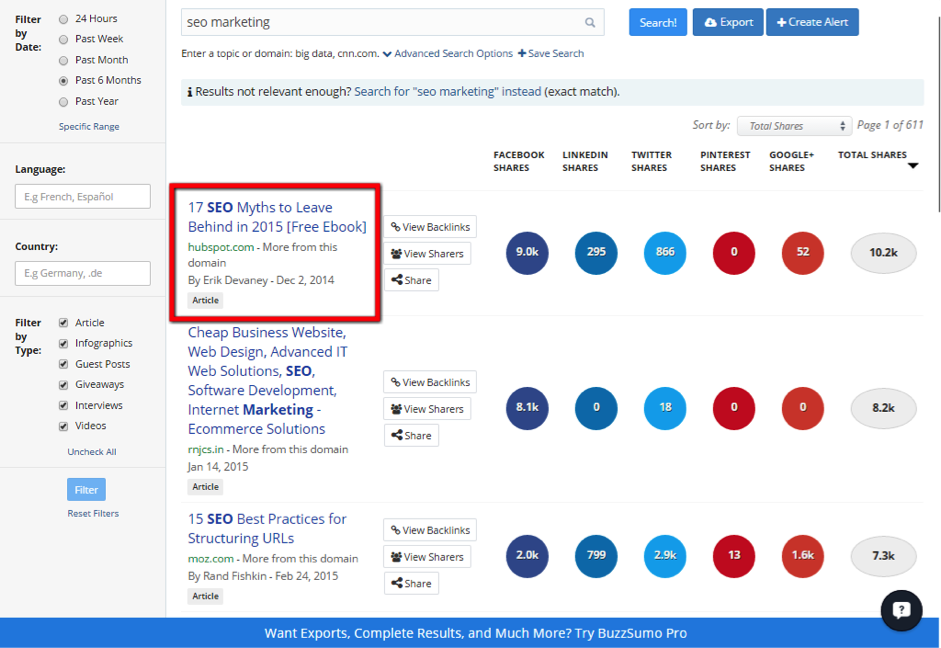
Head over to Buzzsumo and enter the keyword phrases you want.

For instance, my favorite blog topic is "SEO marketing" and here it how to use Buzzsumo to find content that gets more shares and links.

seo

Instantly after entering your keyword you’re not only provided with lots of articles, but it also shows you the total number of shares including Facebook, LinkedIn, Twitter, Pinterest, and Google+.

In the above scenario, we're came up with excellent post ideas like "17 SEO Myths", "15 SEO Best Practices" etc. All of these are great blog post ideas and you can definitely improve them by providing more data, creating Infographics, or doing expert roundups, etc.

On the left side, it also has some filters to help you find what type of content form you want (including articles, Infographics, videos etc).

Buzzsumo is not only free (although it has premium version) but it is amazing way to find high quality content in your industry.

Step 2: Make it even better (create timeless content around it)

Once you have a list of great content ideas that are proven to bring you results, you now need to make it even better.

One of the simplest ways to get more backlinks, shares and comments on your blog posts is to making your content a "one-stop source". How can you do that?

If you're posting textual format of contents on your blog, write detailed posts.

In one of his blog posts, Neil Patel discovered an "average content length for a web page that ranks in the top 10 results for any keyword on Google has at least 2,000 words."

seo1

Similarly, if you're creating videos or Infographics, make them better by creating an appealing design. In summary, add something extra to the high performing content in your niche and make it epic.

Step 3: Outreach to the right people to get more buzz

Once you have epic content on your blog, it's now time to reaching out to the right people in your niche.

How can you find out the people who are interested in promoting your content?

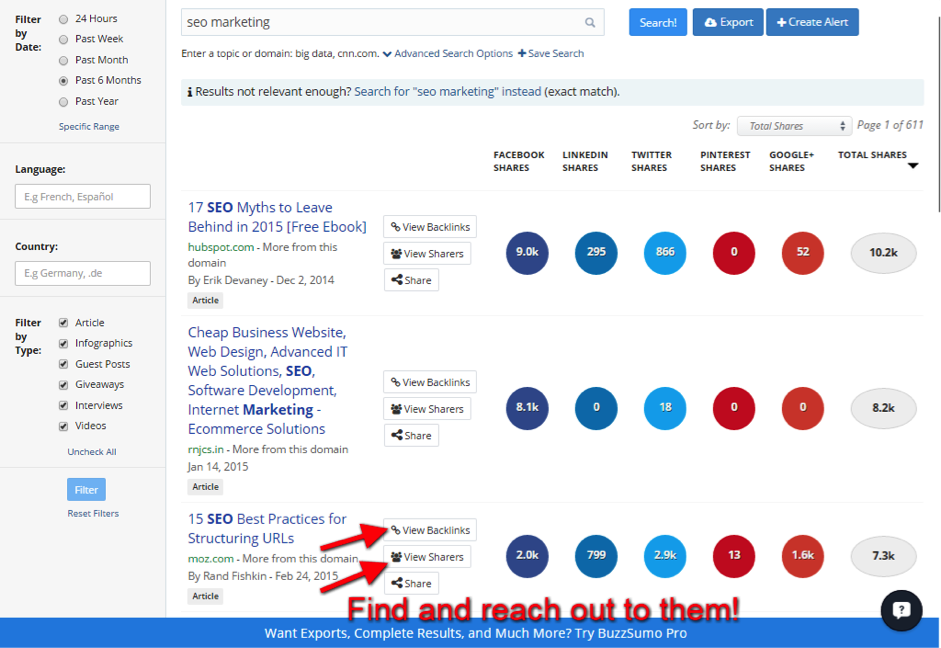
You can again use Buzzsumo. Here's how. When you enter a keyword on Buzzsumo, it shows you who linked to the top content including the social sharers.

seo2

Now, reach out to them. Connect them on twitter, find out their emails and start creating more buzz. You can also use tools like Majestic SEO, Open Site Explorer, ahrefs etc to find all of the links pointing to your competitor's content. And when you reach out to them after creating a link worthy post, you’ll have more chances of getting links to your sites too by asking them without being pushy.

#2. Using content upgrades to boost your email list

Whether you agree it or not, email list is golden. Having a list of hungry email subscribers is an asset for every blogger.

Having an email list will not only increase your blog traffic but it will also boost your sales and trust with the readers. Email list is the second biggest traffic source for Neil Patel's QuickSprout blog. And for most bloggers the same is true – email list is their top traffic source!

So why not invest your time wisely on building an email list instead of focusing on SEO? Instead of trying all the list building strategies under the sun, it's better to go for one crazy idea that increases your list. Content upgrade is one such list building strategy that helps your boost your subscribers quickly.

What is a content upgrade?

A content upgrade is an extra bonus that is extremely relevant to your post topic.

For instance, if you've a popular blog post titled "10 ways to supercharge your SEO", you could create something like "on-page SEO checklist" to use as a content upgrade to boost your email list.

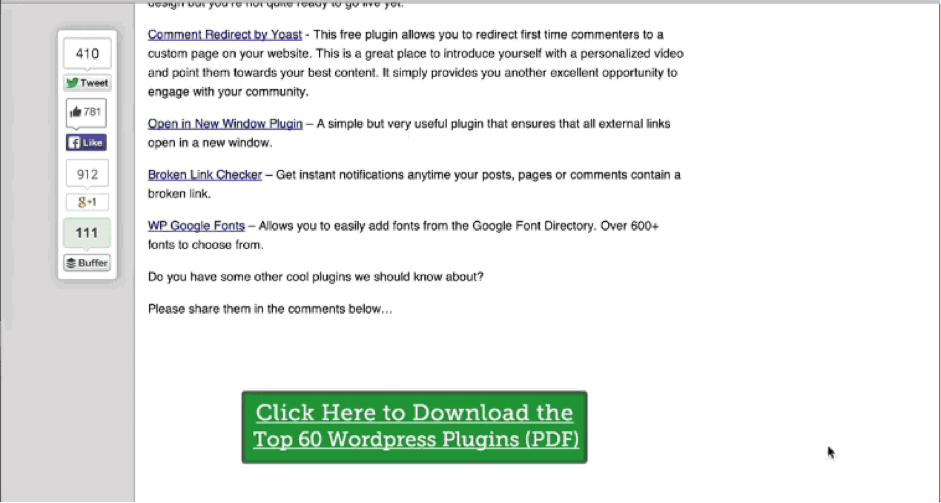
A content upgrade looks something like this:

seo3

How using content upgrades can triple your email list?

Content upgrades are usually given away for free to the blog visitors in exchange of their emails.

Content upgrades are extremely specific. Hence, they convert really well. If you want to convert normal website visitors into subscribers, start using content upgrades.

Do they work? Yes, they do.

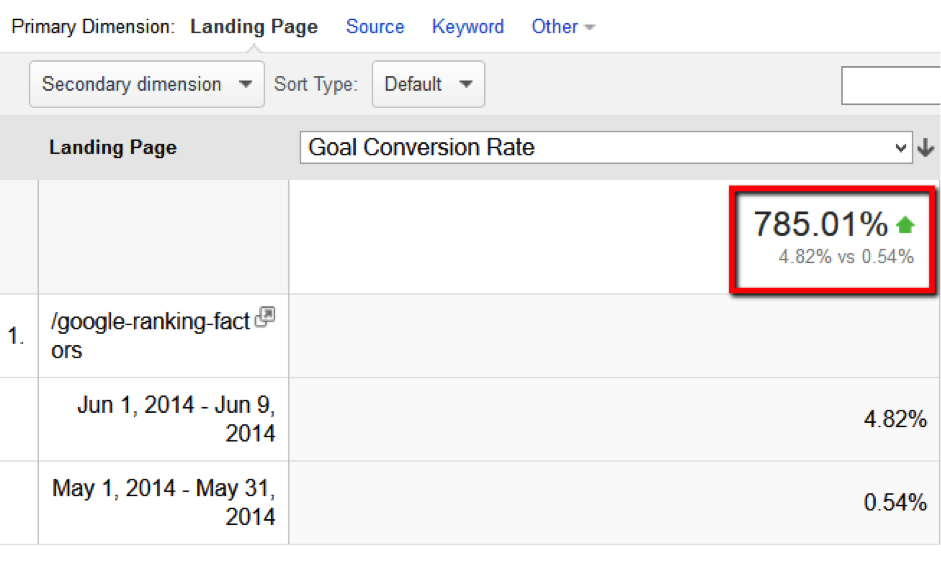
Brian Dean gives away a post-specific resource on one of his most popular posts.

Did you know that he got a whopping 785% increase in conversions (compared to the previous month).

seo4

That's A LOT, right? That's the reason why you need to start focusing on creating content upgrades for your top performing posts or pages.

So how to create content upgrades to increase your overall email list and traffic?

First off, find out five top-performing posts on your blog.

Create a list of posts that got more comments and shares. Also use Google Analytics to find out the top pages that are sending you more traffic from search engines.

Once you've the list of popular contents on your blog, you now need to create content upgrades. You can create a bonus, checklist, video or anything that adds more value to the current post.

And you can use tools like LeadPages, SumoMe etc to create content upgrades on your blog posts or pages to grab more email subscribers.

#3. Create an "after post" checklist to get more visibility

Did you know that you'll get better results when you spend most of your time on promoting your content rather than creating it? Blog post promotion is to get more visibility on your blog posts.

If you’ve creating a great blog post, instead of sitting back and waiting for someone to find your content – it’s way better to create a content promoting routine.

After you publish a blog post, make sure to do the following:

Promoting on social media: Social media is the new SEO. If you want to boost your overall website traffic, be active on social media sites like Facebook, Pinterest, Twitter, Google+ etc. Almost every blogger on earth use these social media networks, so you’ll get more exposure for your blog posts if they have attention grabbing headlines.

Posting to forums: Find out the relevant forums in your niche and connect with the other bloggers. Share and comment on their links, and whenever you have posted something on your blog, make sure to submit your links. And ask for a feedback from other bloggers. This is the surefire way to get more visibility on your posts.

Submit to social bookmarking sites: Digg, StumbleUpon, Delicious – all are social bookmarking sites that have huge readers. If your post does well on these sites, take it for granted that your overall search traffic will also increase overtime.

Leave comments on other blogs: Want to get more comments on your blog posts? Then, start leaving thoughtful comments on other blogs that are similar to your blog's topic. Use their names while leaving comments and ask intelligent questions to spread your name across the blogosphere.

Here's a great blog post checklist written by Pat Flynn, although it was written a couple of years ago – but it's still worth following.

Spend 2/3 time on promoting “others” stuff and spend the remaining 1/3rd time on promoting your stuff. Why?

Everyone wants more shares, likes, tweets and comments. But most people don't spend much time on promoting others. What happens if you spend most of your time on promoting others stuff instead of yours? Bang!!

You'll get more attention from the bloggers. You're also helping the community by promoting quality stuff on your networks like Facebook and twitter. Eventually, you'll get more visibility, followers and shares on your own posts too.

So where do you go next?

Then see the results and watch your website traffic grow. Increasing traffic to a blog or website is not a rocket science. By following what works, you can dramatically boost traffic to your blog posts.

Check out the growth hack techniques mentioned above, pick anyone of them and start implementing.

The best part about using growth hacking to your content marketing strategy is this: you'll get results really fast. They don't take months to see the results. You'll see the rewards within days or weeks.

So what are you waiting for? Go ahead and apply growth hacking techniques to improve your blog traffic.

Do you have any more strategies that will increase website traffic without doing any SEO? Let me know if you've any more insightful growth hacking tips in the comments.

Anil Agarwal is the guy behind Bloggers Passion blog where he is helping readers in building their first professional blog and at the same time, helping them build high quality traffic to their blogs.

Originally at: Blog Tips at ProBlogger
Build a Better Blog in 31 Days

3 Growth Hacking Strategies for Bloggers to Quadruple Their Blog Traffic without SEO

The post 3 Growth Hacking Strategies for Bloggers to Quadruple Their Blog Traffic without SEO appeared first on @ProBlogger.