Ads 468x60px

ProBlogger: How to Prevent Black Hat SEO Techniques Against Your Vulnerable Website

ProBlogger: How to Prevent Black Hat SEO Techniques Against Your Vulnerable Website

Link to @ProBlogger

How to Prevent Black Hat SEO Techniques Against Your Vulnerable Website

Posted: 14 Jun 2015 07:10 AM PDT

door-green-closed-lock

This is a guest contribution from Dennis Rundle.

Black Hat SEO practices have been going on for years without any signs of slowing down.

Regardless of the efforts Google makes with the purpose to stop black hatters from attacking vulnerable websites, these tactics haven't become obsolete. Black Hat SEO practices are usually performed with the purpose to trick search engines. Some of these strategies include doorway pages, keyword stuffing, and invisible text.

Doorway Pages as a Threat to Your Website

Doorway, also known as a bridge page, entry page or jump page, is a page that black hatters design for the purpose of gaining top positions in Google's search results. This page seems relevant to the search engine because it contains the right keywords. It usually includes hidden text, which is stuffed with keywords and phrases that would rank it in the search results.

Who would be interested to attack your website with a doorway strategy? That would only rank you higher, right?

Wrong!

First of all, let's clarify one thing: doorway pages are a black hat SEO strategy that won't help your site on the long run.

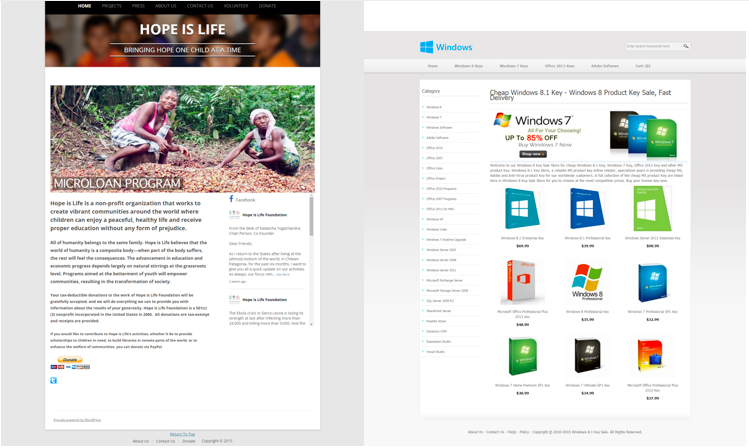
When a hacker compromises your website, he will incorporate hidden spammy links that will redirect visitors from the search engine (which is listing this page) to illegal or malicious sites that steal credit card numbers, sell pirated software, offer fake luxury goods, prescription drugs, beauty products and slimming pills, or promote adult/gambling content. As an example, here is the comparison of the regular website of Hope is Life against the page that appears when you follow the link from Google search results:

Screen Shot 2015-05-22 at 12.08.13 pm

The techniques that hackers usually use for such purpose include creation of rogue files and directories, modification of existing files, or adding URL rewrite rules to server configuration files. If the webmaster isn't diligent enough, these changes may remain active for a very long time. Since the hacker can place the rogue content outside of the host site's file system, you won't notice anything suspicious when checking the integrity of your website's files.

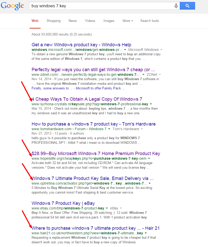
Here is an example of a Google search that contains a link to a redirecting doorway page:

Untitled1

As you can see, some of these results are hosted illegally on servers that have nothing to do with the keyword in question. The most common keywords that hackers include in such cases include target words such as price, buy, discount, prescription drugs, porn, casino, payday loan, bargain, cheap, free, review, cheap luxury, along with a branded keyword, such as zanax, cialis, viagra, Chanel, etc.

If you conduct a Google search for buy cialis or buy viagra, for example, you will see many doorways on hacked sites that won't lead to their actual pages.

How to Check if Your Website Has Been Hacked

Cyber criminals have compromised a huge number of websites with the purpose to put their doorways to top search results on Google. In most cases, the hacked websites link to several doorway pages, so the black hatters increase the chances that the search engine will choose at least one of them to display on the first page of the results. This strategy is also useful if Google or the webmaster removes some of these doorways.

This situation puts your website under risk, since it can be a subject to a Google penalty, leading to loss of traffic and a lot of work to fix the damage. Since it can be tricky to determine whether or not your site has been a hacker's target, you have to be more diligent than usual.

Here are few of the things you can do in order to detect a black hatter's attack:

  1. You can find useful information on the Webmaster Central Help Forum. You will probably find the answers before even asking the question, but you can also ask for help from other webmasters if you don't find a solution.
  2. Rely on Google Webmaster Tools, which enable you to set email alerts in case Google suspects that your website has been compromised. Keep in mind that the search engine may take a while before detecting suspicious actions against your site, so rely on this option only as a backup strategy. The Fetch as Google tool is very useful, since it enables you to find out what the search engine sees when indexing your site.
  3. You can (and should) set up a Google alert for the words site:domain.com. With this strategy, you can reveal suspicious titles and page descriptions of your web pages. Google will instantly notify you about any new content the search engine indexes. If something seems shady, you can take action without delays. You can set up such alerts on the Google Alerts.
  4. Try to locate new pages with unusual content or 404-error; they indicate that the search results probably direct to suspicious websites.
  5. Pay close attention to GWT alarms. Check the malware status of your website.
  6. Check the search results your website is listed in. Compare the pages you enter through Google with those you get with direct entrance in the browser.

How to Prevent Black Hatters' Attacks

Prevention is always better than treatment. The best way to avoid unpleasant scenarios caused by a hacker is to make your website really difficult to compromise. These are the things you can do for such purpose:

  1. Use strong usernames and passwords

You simply cannot be negligent when it comes to your website's security. Only your system administrator should have the permission to maintain the site. Never use default names for application administrators, since they make your website an easy target.

  1. Secure all administrative files

You need to use a website firewall in order to provide strong protection for your website. Firewall technology has come a long way since its beginnings, so you can finally find effective, but affordable options that will protect your website.

You can also use an integrity tool that will notify you about changes in the file system. If you are aware of all changes that are being made, you will immediately spot an attack. Also you could also ask for an advice from our professionals http://webmastersafeguards.blogspot.co.uk/

Remember: You need an efficient remedy

No matter how hard you try to protect your website against hackers, it may still become a target at any moment. If a hacker managed to achieve sneaky redirection, you are in danger of greater damage. This means that you need to have a backup plan just in case. If you perform daily backups of your website, you will avoid losing valuable files in case of attack.

Dennis Rundle is CEO of “Webmastersafeguards”, an internet geek, and security enthusiast. His goal is to promote fair and square rules for all websites and to eradicate malware.

Originally at: Blog Tips at ProBlogger
Build a Better Blog in 31 Days

How to Prevent Black Hat SEO Techniques Against Your Vulnerable Website

ProBlogger: 3 Steps to Saving Time by Writing Social Media Updates in Batches

ProBlogger: 3 Steps to Saving Time by Writing Social Media Updates in Batches

Link to @ProBlogger

3 Steps to Saving Time by Writing Social Media Updates in Batches

Posted: 11 Jun 2015 07:00 AM PDT

fashion-man-person-handThis is a guest contribution from Tom Van Buren.

Scheduling updates in advance solves a number of social media's most frustrating problems. It gives your routine newfound flexibility, and it can even make you a better blogger. But there's one hurdle that scheduling alone doesn't take care of for you: those updates still have to come from somewhere, and that means you have to write them.

Part of the appeal of scheduling is that it stops social media from interrupting your life every time you want to post an update, but without a sound strategy for actually writing those updates, you might just be trading one type of frustration for another. This post will show you how to write social media updates by the batch, so you can more easily grow your fanbase and drive more reliable traffic to your blog.

Think about more than just your own traffic

Social media is an invaluable resource for driving traffic to your own website, but getting carried away can do more harm than good. Forty-five percent of users cite excessive self-promotion as a reason why they would unfollow a brand on social, which means your strategy has to be a lot more refined than just sharing your own links.

Break down your typical updates into categories by type, so there's variety to the content you share. In addition to posting links to your own blog posts, for example, you might also use social media for posting tips, linking to useful content on other websites, sharing inspirational or funny quotes, and so on. (Quotes and tips in particular are useful for getting shares, which can help you grow your audience.) These categories will guide you through the next step of the batching process: actually writing your updates.

Save time by writing in blocks

If you regularly schedule your social media updates, you might already be writing them in batches – just very small ones. For example, you might set aside time every morning to write and schedule your updates for that day. While this works in theory, it prevents you from developing a big-picture strategy, and it isn't saving you as much time as it could.

Use the categories you defined to write as many updates you can within a certain time frame (much like the longstanding Pomodoro Technique suggests). Take 20 minutes to write as many updates as you can promoting your various blog posts, then another 20 for tips, and so on. Writing as much as you can within a certain time period gives you the ammunition with which to load your schedule, and it helps you build and maintain creative momentum as you go.

Writing bigger batches like this may seem like a major time commitment, but think of it like making a weekly trip to the grocery store instead of going every day. It may feel like you're spending more time at the store, but for as long as the groceries last, you're not wasting time on things like planning meals, making your list, driving back and forth, unloading the car, and so on. Once the work is done, it's done.

The amount of time these updates last will vary depending on how often you post, but there's one final step you should take to make sure that you get as much out of them as possible.

Save your work and re-use your updates

Without the right plan, social media marketing can feel like a neverending zero-sum game – you work hard writing updates, but once you post them, they're gone, and you start again from square one every time you run out.

This cycle of always starting over from nothing is a major waste of time and your work. If you're posting to Facebook and Twitter five times a day each, you might be writing as many as 310 brand new updates every single month – more than 75 per week. That's a lot of effort to put into a task that doesn't add up to anything.

Instead, maintain a document that saves your status updates. (Spreadsheets are particularly useful, because they allow you to organize your updates by category.) Every time you write a new batch of updates, add it to your document, so that over time, you build up a library of updates from which you can choose ones to schedule. Eventually, you'll be able to write batches less and less frequently, because you can choose from the updates you've already written.

Why post the same update more than once? In addition to saving time, there are two big reasons:

Most of your followers don't see any given update

Every time you post an update to social media, you're trying to hit a moving target – and no matter what network you're posting on, that target is pretty small. Consider these statistics:

  • Most Twitter users don't log on even once a day (and 40% log on less than once a week)
  • The average organic reach for a Facebook page is about 7%
  • 87% of LinkedIn users log on once a week or less

Only a very small segment of your audience is likely to see any given update you post on social media, so if you share the same thing more than once over time, it's unlikely anyone will notice – and you never have to feel like you wasted time writing and scheduling a post that didn't get any traction.

Evergreen blog content drives more traffic

New social media followers always have something in common: they've probably seen very few of your updates from before they started following you (if they've seen any at all). If they're new to your blog audience, then they've probably been exposed to very little of your blog's older content, too.

Your evergreen blog posts are literally as good as new to anyone who hasn't seen them before. If you're not continually promoting those posts on social media, they're gathering dust in your archives and going to waste.

This is why it helps to categorize your updates and save them over time. Maintaining a growing stockpile means you never have to go back and write new updates promoting old posts – you can simply keep your existing updates that promote evergreen posts in rotation, so they'll continue to drive new traffic. Neither your social updates nor your blog posts go to waste, and the work you put into writing both generates cumulative results over time.
If you schedule your social updates in advance, how often do you set aside time to write them? And if you haven't tried scheduling before, what's stopping you?

Tom VanBuren is the content and social media manager for MeetEdgar.com, where he writes about social media and online marketing.

Originally at: Blog Tips at ProBlogger
Build a Better Blog in 31 Days

3 Steps to Saving Time by Writing Social Media Updates in Batches