Ads 468x60px

ProBlogger: How To: Customize HTML of New Getty Images for Your WordPress Blog

ProBlogger: How To: Customize HTML of New Getty Images for Your WordPress Blog

Link to @ProBlogger

How To: Customize HTML of New Getty Images for Your WordPress Blog

Posted: 21 Apr 2014 08:40 AM PDT

This is a guest contribution from Bhagwad Park of hostoople.com.

As we discussed last week, Getty Images recently opened up millions of its images for free usage. Coming from a professional stock photo website, this is a phenomenal step and one that will be greatly appreciated by thousands of bloggers all over the world. Most of us have been in the position where we have found a really appropriate picture to use only to find that it is copyrighted and requires a license fee to display. Now we can have access to the best photographs on a dazzling variety of subjects for free. By default, Getty Images provides you with a stock I-frame that displays the image as well as the credits link. What we want is to find a way to properly incorporate it into our WordPress post so that it fits in nicely with our theme and aligns properly.

Getting the Embed Code

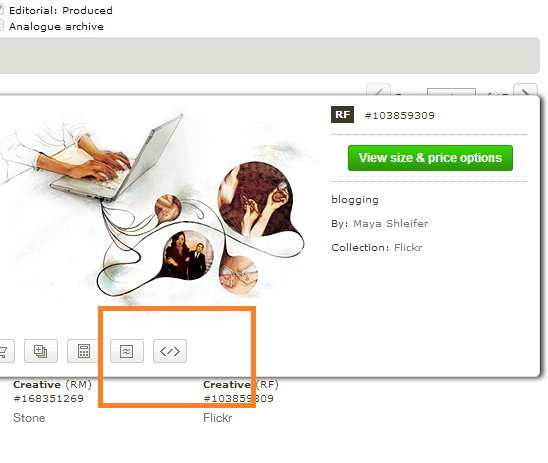
The first step is to find an image that is embeddable. Getty Images hasn't opened all of its pictures to the public – just a large fraction of them. So for example if I have initiated a search using the term "blogging", I will get a number of results and I need to figure out which once I can use. To do this, hover your mouse over each of the icons and you will get a pop-up. The ones we're looking for have an "embed" button along the bottom of the picture to the right of all the other icons as shown in the screenshot below.

embeddable

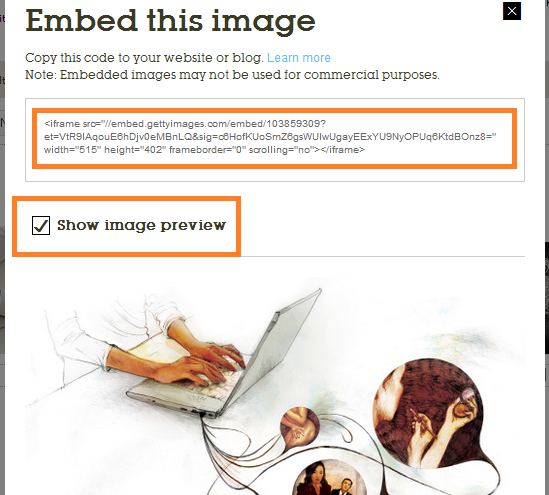
Clicking this icon will bring up the code to display it on your website. It takes the form of an I-frame that you need to insert into the HTML of your document. It comes with a default height and width and you will probably need to change to adjust it to fit your site. Below it, is a checkbox to toggle the image preview on and off. Enabling it will show you how the picture will look.

paste code

Aligning and Resizing the Image

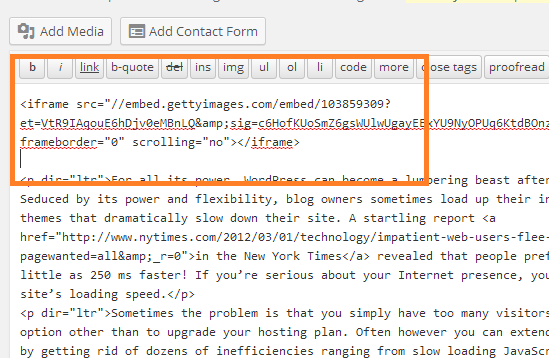
Let's say we want to embed this image in the top left corner of our post. Go to your WordPress visual editor, and enter the HTML editing mode by clicking the "Text" tab on the right-hand side. This will allow you to edit the raw HTML in your content. Paste the copied i-frame code right at the very top as shown in the screenshot below. If you preview your post now, you will see that the image is the very first thing displayed with all of the text underneath it.

code and preview

But what if we want it left aligned so that our text "flows" around the image? To do this, we need to add the following code to our I-frame as an attribute:

align=”left”

Place this immediately after the I-frame tag as shown below:

align left

Now when you preview the image, it will be left aligned with your text appearing to the right of it. But what if we need to reduce the width so that it more easily fits in with the dimensions of our blog post? Let's say we want to reduce it to 300 pixels instead of the default 515. To do this, simply change the "width" attribute in the HTML to the pixel size you require. In our case, we change it to:

width=”300″

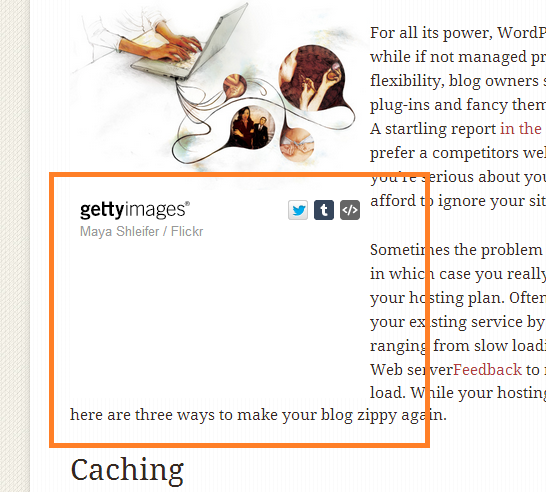
This reduces the width but leaves the height intact which is a problem. As shown in the screenshot below, reducing the width without changing the related height attribute will leave a lot of whitespace below the image.

whitespace problem

Changing the height is a matter of trial and error. The Chrome developer tools do a great job of allowing you to experiment with the right height. In my case, I found that 268 is the optimal height. So I changed the related attribute to:

height=”268″

This gives me a left aligned image with perfect dimensions on my blog. Using these simple instructions, you can have the very best pictures suited to your content for free – thank you Getty Images!

Bhagwad Park is a writer for hostoople.com, specializing in WordPress. You can follow him on Google+ here.

Originally at: Blog Tips at ProBlogger
Build a Better Blog in 31 Days

How To: Customize HTML of New Getty Images for Your WordPress Blog

Shoemoney - Skills To Pay The Bills

Shoemoney - Skills To Pay The Bills

Link to ShoeMoney

3 Sure Fire Ways to Get Bloggers to Ignore Your Emails

Posted: 21 Apr 2014 06:45 AM PDT

Post image for 3 Sure Fire Ways to Get Bloggers to Ignore Your Emails

Are you a blogger and gave gotten a random request from someone you don’t know asking you to link to their site?

Or better yet, asking if they can guest post?

Yet… when you read the post, it looks like it’s been written by a junior high school drop out in some 3rd world country?

Yeah, I get shit tons of that.

Shady affiliate networks, advertising platforms, finance products, insurance, viagra, dating site.. Ugh…

They rarely contribute any good articles.

And even if they DO write good stuff, they want a back link to some really shady looking site that I would never link to even if I get paid to do it.

Please, where on earth do these people learn their manners from?

Here’s the thing.

Most of you already know how this works… yet most of you choose to ignore the rules.

So, you still wanna get ignored?

No problem. Here’s how.

1) “Give Me, Give Me”

For example, do you go on a first date with a girl and ask her to come home with you THAT night?

There’s 99% chances that you won’t. On top of that, she’ll probabaly never call you again.

But even if you do succeed, do you really want to have a long term relationship with her? What makes you think you’re the 1st one she’s done this with? Yeah, probably not.

So either way, you really CAN’T win by asking for the close first. You have to give first. Get to know her.. build rapport, and heaven forbid, even give her something.

If you’re reaching out to a media person (journalist, blogger, youtuber, or some other social media maven) and you ask for something, you’re asking him/her to risk the very reputation he/she has built up to showcase you.

Stop talking “me me me”.

UGH.

Give me something first. Get my trust. Shit, write me a well thought article.

Have you noticed I blog on ShoeMoney a lot?

It’s because Jeremy trusts me because I’ve been writing for his blog for MONTHS.

2) Copy/Paste Job

Hello,

I am really satisfied with your blog content, your posts are really good and you are keeping it well. I would like to publish my post on your blog (as guest post) with my website link. Mostly I create about educational and student related subjects. Please let me know if you are recognizing guest posts and I’m ready to discuss my content, I guarantee it with unique and quality content.

Looking forward to get your reply.

Thank You

Yeah, if you’re a girl doing online dating, I’m sure you know Mr.Ctrl-C/Ctrl-V.

Shotgun approach, saying the same ol’ stuff to everyone in the neighborhood.

Seriously, if you go to networking events, do you say the SAME thing to everyone?

Remember telemarkters? They were NOTORIOUS for that.


Notice how I write?

This is how I talk.

And that’s why people read what I write.

If you’re gonna ask for someone to do a favor for you, be normal and talk normal.

3) Do You Even Know Who I Am?

Good morning FSC?

I wanted to commend you guys on the great piece about the 3 most overlooked A/B tests. I found it really interesting and insightful, then sent it on over to the marketing team I liked it so much, so thanks for the great read!

Anyway, I wanted to get in touch with you in order to pitch an article I’d like to write for Fresh Super Cool. I was thinking something in regards to how a business can improve its business’s online reputation through Instagram, because I think it hasn’t been touched on a ton yet.

Let me know what you think, I’d love to discuss the idea more and some of the specifics. Thanks for the time!

All the best

I have a freakin’ name.

If you go to my awesome marketing blog, I have my face plastered ALL over it.

Would a girl go home with you even if you don’t even know who she is?

Yeah, those are called prostitutes.

She’ll take your money and give you a nice fat genital herpes that make you pee fire every morning.

Do you want that? Me neither.

Looking for an SEO service that won’t get you banned?