Ads 468x60px

ProBlogger: 44 Things Bloggers Should Be Delegating to Virtual Staff to Catapult Their Online Growth

ProBlogger: 44 Things Bloggers Should Be Delegating to Virtual Staff to Catapult Their Online Growth

Link to @ProBlogger

44 Things Bloggers Should Be Delegating to Virtual Staff to Catapult Their Online Growth

Posted: 06 Apr 2014 08:01 AM PDT
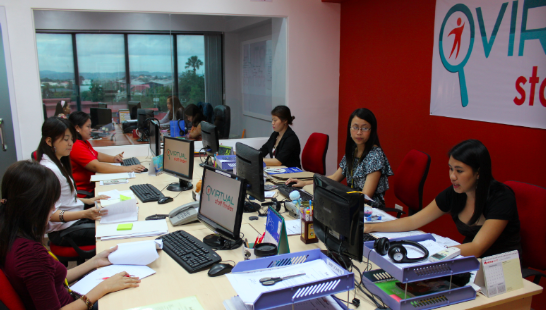
Chris' internal team, based in Cebu City.

Chris’ internal team, based in Cebu City.

This is a guest post contribution by Chris Ducker.

One of the biggest pain points that comes up when I talk to bloggers about growing their blogs is that there simply isn't enough time in the day to do everything they need to, to truly start to catapult the growth of their blog/s.

As someone that is all about productivity and helping other entrepreneurs achieve the ability to 'buy time' and inject that additional time into their businesses and lives, I've seen dramatic changes in not just productivity levels, but also income levels, after strategizing with content marketers on the way they can simply get more done by working with, and building a virtual team.

So, what I've decided to do is put together the following list to help you discover the different tasks you can outsource to virtual staff, along with the type of worker that would naturally handle those tasks, to make your delegation as easy (and pain free!) as possible.

I've included the different type of virtual worker in this list, because its important to understand that there is no one 'Super VA' that can do everything for you. If you want to experience real success in working with virtual assistants then you need to hire for the role, not for the task (unless of course you are literally just outsourcing a task that needs to be completed, such as a logo being designed!).

I've also broken the list up into five clearly different sections for easy digestion and additional brainstorming, as follows:

  • Research
  • Creation
  • Publishing
  • Promotion
  • On-Going Marketing

Remember, this list is not final in any capacity. Some of these tasks you might never get around to delegating, there might even more others that I've not included that you'd be rushing to offload, if you could.

Research

Making time to properly research and prepare for your content creation is an important part of the process. However, many bloggers simply don't spend the time they sometimes need to get all their ducks in a row, before the 'creation' begins, because of time constraints, which is a shame.

1. Make a list of topic ideas in any niche, using Google Keyword Tool. (General VA, Writer, SEO VA)
2. Group similar topics and figure out if they can be turned into a series of posts, or even more – ebooks, etc. (General VA, Writer)
3. Figure out what TYPE of content should be created to serve the topic best. Written, audio, video, etc. (General VA)
4. Produce an outline for posts, videos, podcasts, or a rough storyboard for other type of content, such as Slideshare docs, etc. (General VA, Writer)
5. Find similar online content and create a 'Likewise List' to use later on, when promoting. (General VA)
6. Identify Facebook and LinkedIn groups, which can be used to promote and share content when published. (General VA)

Creation

A lot of bloggers and other types of online content creators have real problems 'letting go' of this part of the process. However, there are so many different tasks involved here that its simply impossible to be good at all of it.

I do want to say, however, that there is one thing that you should NEVER outsource – and that's your actual CONTENT. Meaning, write everything yourself, shoot and record everything yourself. It's your voice, your personality, your stories and experience that people are following you for, and tuning in for.

7. Edit video, including intro and outro bumpers and lower thirds. (A/V VA)
8. Transcribe the entire video file into Word, to use as blog posts, YouTube description, and more! (Writer, General VA)
9. Edit and finalize podcast session, including intro, outro, CTA's and list episode mentionables. (General VA, A/V VA)
10. Transcribe the podcast episode for use as additional SEO content. (General VA, Writer)
11. Transcription into a free PDF download (General VA, Writer)
12. Create 'Draft Post' in WordPress, adding bold, italics, etc., to your pre-written content. (General VA)
13. Format the Post: Add H2 and H3 tags to sub-headings and sub-sections and bold, as needed. (General VA)
14. Find and add an image to the post, if needed. Best to use your own images whenever possible. (General VA)
15. Add image title, alt-text & caption into WordPress. (General VA)
16. Embed related video content. (General VA)
17. Capture video screenshots if required, then resize and insert them into the post if needed. (General VA)
18. Embed any audio, or podcast sessions if required. (General VA)
19. Put the post in the correct categories, and be sure to also include relevant tags. (General VA)
20. Optimize the post for SEO using the correct plugin's. (General VA, SEO VA)
21. Create 'Tweetable' images to use on Facebook, etc. (General VA)

Publishing

After all that research and content creation, its time to share your work with the world. Not exactly super time intensive, but with some solid procedures in place, you will literally never have to do any of this stuff again.

22. Upload video to YouTube, with title, links, keywords, categories, as well as transcribed text. (General VA)
23. Add video to relevant playlist. (General VA)
24. Upload audio file to server, tagged and with podcast image attached. (General VA)
25. Final proof read for spelling, punctuation and grammar errors. (Writer, General VA)
26. Draft and schedule 'Broadcast' email in Aweber. (General VA, Writer)
27. Schedule post, or simply hit 'Publish'. (General VA)

Promotion

Once your content has been published, promotion takes over. After all, there's no point in spending all this time to solve problems and answer questions for your audience, unless you work just as hard in getting as many eyeballs on your work as possible.

This can be incredibly time-consuming in today's very savvy, social world. The following list will get you moving faster than ever, all with the help of your virtual workers.

28. Share your content on your personal social media accounts, as well as your blog's Facebook page. (General VA)
29. Share your content on related Facebook and LinkedIn groups. (General VA)
30. Schedule Tweets to go out every 6-hours for the next 48-hours after publishing content. (General VA)
31. Social bookmark the content on StumbleUpon, Reddit, Digg, etc. (General VA. Writer)
32. Contact anyone you mentioned in the content with a pre-written email, as they might like to share it. (General VA)
33. Comment on the Top 5 posts from your 'Likewise List'. (General VA,Writer)
34. Wake up your Email List by sending that drafted 'Broadcast' message. (General VA, Writer)
35. Social bookmark any content commented on, helping to gain more traffic to the post. (General VA)
36. Share the featured image of your post on Pinterest, Flickr, etc., including a link back! (General VA)
37. Share infographic's on the top distribution sites. (General VA)
38. Share PDF transcripts of your video, or podcast content to Docstoc, SlideShare, etc. (General VA)
39. Promote your SlideShare content on LinkedIn, Twitter & Facebook in order to get homepage exposure. (General VA)
40. Post your 'Tweetable' images to all your social media profiles and pages, to promote clickthru's. (General VA)

On-Going Marketing

There is a big difference between 'promoting' and 'marketing' in my eyes. Promoting is what you do to 'get the word' out there about something you're in the process of, er, well, promoting!

Marketing, on the other hand is an on-going way to create opportunities and bring in traffic, opt-in's and ultimately, business – this is exactly the type of area that a lot of bloggers take their eyes off of once their content has been published and initially promoted.

Silly move – why stop telling the world about your stuff? Keep doing it – whenever relevant, I say!

41. Add this recent content to your 'Blog Bank', for easy access when creating fresh content and linking. (General VA)
42. Build internal links to new content from your new archive. (General VA,SEO)
43. Create a summary of the content and include it on Tumblr. Add media and a 'Read More' link to original. (Writer, General VA)
44. Social bookmark the summarized content on Tumblr, as well as StumbleUpon, Reddit, Digg, etc. (General VA)

Conclusion

The big problem here is that a lot of bloggers are quite trapped in their ways of doing it all themselves. This is not surprising considering that starting, growing and running a blog is a pretty lonely caper, lets face it!

However, as you can see, the General VA role is the one person you need to start looking at bringing on full-time as soon as you're able to. How much more could you get done, how many more posts could you publish, products could you create and events to could you attend if you had someone handling the majority of this for you?

I know a lot of bloggers haven't ventured done the outsourcing road yet, so I'm happy to answer as many questions as you can fire at me, in the comment section below and if you're attending the ProBlogger Event in August, I simply can't wait to meet you in person – it's going to be a lot of fun!

Chris poses with some of his VAs, based in the Philippines.

Chris Ducker is a serial entrepreneur, blogger, podcaster and speaker. He is also the author of the new book, Virtual Freedom: How to Work with Virtual Staff to Buy More Time, Become More Productive and Build Your Dream Business. You can follow him on Twitter.

Originally at: Blog Tips at ProBlogger
Build a Better Blog in 31 Days

44 Things Bloggers Should Be Delegating to Virtual Staff to Catapult Their Online Growth

Review: Audience Business Masterclass, from Firepole Marketing - DailyBlogTips

Review: Audience Business Masterclass, from Firepole Marketing - DailyBlogTips


Review: Audience Business Masterclass, from Firepole Marketing

Posted: 05 Apr 2014 10:52 AM PDT

You might have noticed me mention Firepole Marketing and its owner, Danny Iny, a few times over the past months.

Firepole Marketing is a great blog for any entrepreneur or professional blogger, aimed at helping you grow your business.

Danny's one of the marketers I respect most online, because of his honesty, the quality of his work, and the way he manages a perfect blend of telling-it-like-it-is with being genuinely encouraging and supportive of new entrepreneurs.

Over the past months, I've been enrolled in his Audience Business Masterclass – a 14-week course on building an audience-focused business. (Or, as you might prefer to think of it, a successful blog. ;-))

Overview

Audience Business Masterclass (ABM) is an online course delivered in weekly instalments, aimed at people who want to create a successful online business. As well as the weekly lessons, it comes with three months of technical support from Danny's team.

It costs $782, paid for in six monthly instalments of $127.

What's Included

ABM includes:

  • Weekly videos, with an audio-only plus transcript option. These normally run to around 20 minutes, though some are a little shorter and some are longer. [CHECK]
  • Detailed worksheets to help you implement each lesson. If you're anything like me, you probably have a tendency to absorb course materials without really putting them into action. I found completing these worksheets was a great way to get moving.
  • Bonus reading and lots of examples. While the videos deliver the core course content, there are loads of extras. These include filled-out worksheets (by one of Danny's team members who's launching her own side business) to help you really "get" what you're doing.
  • Technical support. Danny's team are on-hand to help you with any technical woes. I've not had to use this myself, but having seen the team in action on webinars, I know they're extremely helpful and competent. 

The Good Stuff

There's an awful lot that I like about ABM (otherwise I wouldn't be reviewing it!) but I'll pull out just two of the best things for me:

#1: Fresh Tips (Even For Me!)

Honestly, to begin with, I was a bit doubtful about whether I'd learn anything new from ABM. I've been blogging professionally for six years – and I've read a lot of ebooks and taken a lot of courses along the way.

However, several of Danny's tips were brand new to me, and overall, I've been really impressed by the level of detail and insight in the course.

#2: The Quality of Course Materials

I know this might seem a rather nit-picky thing, but I really dislike buying an expensive course that has poor-quality materials. What especially impressed me about ABM is the quality of the transcripts – they're well edited and formatted for easy reading.

The video and audio of each lesson is great too, of course; I was impressed how succinct these were, and I loved the way that each one has an introduction and conclusion to help tie it in with the other lessons.

#3: The Amazing Guarantee

ABM has literally the best guarantee I've ever seen for an online course. I'll quote from the sales page:

I guarantee that, as long as you do the work, apply what I teach you, and reach out to us when you need help, you’ll be earning at least $3-6K/month within your first year.

And if you don’t, I’ll refund your tuition, and pay you $1,000 out of my own pocket.

Given the course's price, this is a great guarantee that makes it easier to justify spending that much money – if you're confident you'll be earning $3K/month by month 12, you'll easily recover your costs.

The Not So Good Stuff

There's very little that I disliked about ABM, and these points aren't really criticisms, just areas that are worth thinking through before buying.

#1: The Price

While I think ABM is definitely worth its price – especially with the guarantee – I also think this is a pretty significant investment for people who haven't yet started their blog.

I also found the pricing structure slightly odd: six payments of $127, billed monthly. That's not odd in itself, but the course is delivered over three months and the technical support is for three months, so it would seem to me that it'd make more sense to pay across three months not six. Though, to be fair, I can imagine that many people would rather pay over a longer period of time to spread the cost.

#2: Aimed at Pre-Bloggers

I'm going to coin the term "pre-blogger" here – someone who doesn't yet have a blog but is planning to build one. ABM is aimed at these people, though of course there's tons of good advice in it for established bloggers like me.

While I think it makes perfect sense to begin at the stage of coming up with a business niche, it would've been great to also have a quick-start guide for people with an existing blog and products, or perhaps a "Fix-It" guide for those with a business that's not quite working.

Having said that, I know a lot of bloggers get stuck in the early stages, and going through the lessons from the beginning provides a great reality-check on whether your niche and market have potential or not.

Verdict: Is ABM for You?

ABM is definitely an investment, and if you're uncertain whether you want to build a business at all, or if you have very little time to spend (say 2 – 3 hours per week) then it's probably not for you.

If you're keen to start an online business or if you're already on your way toward having one, though, this is an excellent, comprehensive course packed with everything you need to know. It's not cheap – but you definitely get what you pay for here with great materials and support.

To learn more about Audience Business Masterclass, you can visit the sales page here. But, even better…

Danny Iny is hosting a webinar for us in a couple of weeks, at 3pm EST on April 14th, where he'll be taking us through the key points of the ABM process. He delivered this training for us back in January, and I heard lots of good things from DBT readers – so I know it will be excellent again this time round. You'll also have a chance to ask him about ABM, if you want to.

Just click here to find out more about the webinar, and to reserve your place (it's totally free).


Wanna learn how to make more money with your website? Check the Online Profits training program!