


“The Blogger’s Guide to Google Authorship” plus 1 more |  |

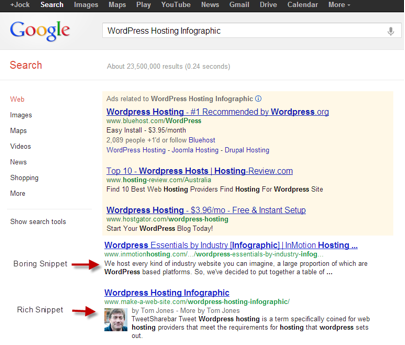
| The Blogger’s Guide to Google Authorship Posted: 31 Oct 2012 01:09 PM PDT This guest post is by Tom of make-a-web-site.com. At the 2011 SMX Advanced event, Matt Cutts announced the Google initiative to support authorship markup, or more simply, to give you ownership of your content in the search results. Let's start with a definition. Authorship, in this context, refers to Google’s parameters for making a verified connection between a person’s original web content and their Google Plus profile. Google created Authorship by developing the HTML markup rel ” author”. When content owners apply it correctly to their content, Google can create the connection with their G+ profile. Google will then display your profile picture next to your content in the search results. If you’ve set Google Authorship up properly, your search results should look something like this. What is rel = “author”?You’re probably very familiar with the standard linking practice for web content. Traditionally, the href in a link refers to the attribute or location where the linked content exists. If you add the attribute rel = “author” to links to your own content, it will associate your ownership—or “authorship”—with the content on the linked page. This is the first step in telling Google that you are the owner and original publisher of that content. The new anchor, with Authorship applied, will look like this: The new markup HTML code rel = “author” is changing the game of search as we know it. Why is Authorship important?Google has made it quite clear with the development of Google Authorship that it’s moving away from regarding pure link-building as a factor in web page authority. Your value as an author will come into play more as Google dials down its dependence on basic links. Another possible effect is that Authorship may increase Google search clickthrough rates. You probably feel that you are naturally drawn to a search result with an image beside it. According to one study, adding Authorship to links increased Google search CTR by 150%. Implementing authorship on your websiteAdding Authorship when making your blog should be standard practice for all webmasters. These are the recommend steps.
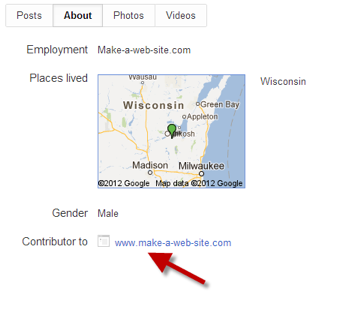
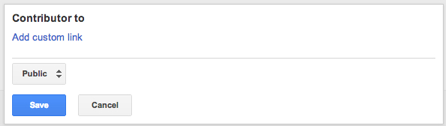
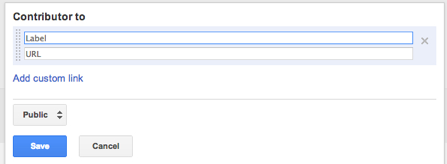
Now, to create the Contributor link in your Google+ profile follow these steps:
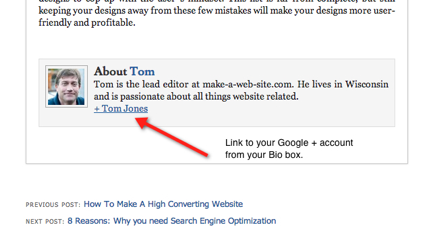
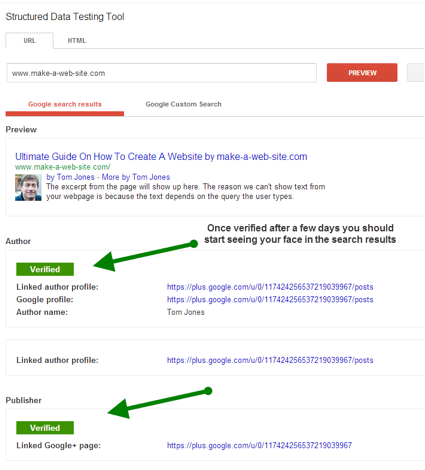
Note: if you are identifying your authorship of the content on your site, link to your root domain name. So in my case it is http://www.make-a-web-site.com. If you are claiming authorship of a guest post, add a link to the guest post. So, for this guest post example the link would be http://www.problogger.net/google-authorship-get-your-photos-in-the-search-results/. Finally, let’s link your content to your Google + profile. Make sure you are use the rel = “author” markup in the code of your guest post bio to verify that you are the original owner of the content. The HTML will look something like this, but make sure you place you Google+ profile address in between the quote marks. What about guest posts?For guest posts, it’s important to make sure you have the correct HTML in your bio box. Make sure you are using the rel = “author” markup. No markup, no snippet! Then, link to that post from the Contributor section in your Google+ profile as I outlined above. The only downside is that you are going to have a lot of links if you are a serious guest poster. How to test it’s workingTo check whether your website or content has been linked to your Google+ profile, use Google’s Structured Data Testing Tool. From the image below you can see that my Authorship of my website content has been verified by Google. What Google has to sayGoogle has posted publicly about this topic. See Google’s head of webspam team Matt Cutts and software engineer Othar Hansson discuss Authorship in the video below. They provide a very concise introduction to what Google Authorship is, including a whiteboard demonstration, how it works, and what the benefit is for webmasters. They also cover the basics of using authorship for SEO. ConclusionBuilding good relationships is the backbone of good SEO. Authorship allows you to make the most of the high-quality, original content you produce—it allows you to become an expert in your field not only in the eyes of your readers, but in the eyes of the Google algorithm as well. Although this project has initially been launched as a way to allow your profile photo to show up next to your results, I believe it will become a larger ranking factor in the future. That’s why it is important to start implementing good habits now. This guest post was written by Tom of make-a-web-site.com. Naturally this article has been rel= “author” to Tom on Google +. Originally at: Blog Tips at ProBlogger The Blogger’s Guide to Google Authorship     |
| Three(ish) Techniques to Unborify Your Blog Posts Posted: 31 Oct 2012 07:02 AM PDT This guest post is by Stephen Guise of Deep Existence. I’m working on a secret project, and it requires that I read studies. The information from the studies is absolutely fascinating, but they are run through a science machine that sucks the fun and life out of them. The verbose verbiage and dry delivery are brutal on the eyes. Fiction: people enjoy academic studies for the writing style. While studies and textbooks have a hidden code that says you must write with the intent to bore, there’s no such restriction on blogs. If your blog is boring, and there is another blog with similar content and enjoyable delivery, you lose. Pack up your keyboard and go home. Unless, that is, you want to unborify it. In this post, I will suggest three excellent techniques to hold your reader’s gaze. When you type it in Word, “unborify” has a red line under it because all new words face initial resistance. This post has already been through the unborifying process, so I hope you enjoy it! Three(ish) techniques to unborify your posts1. Inject humor into bland postsHumor breaks through stubborn minds, making your content instantly more relevant and accepted. Not only that, but humor is funny. I like to use the strikethrough jest. It works by inserting a funny, out of place “what if I wrote THIS” word or phrase in a sentence. Then, use strikethrough HTML to cross it out. Readers can see the ridiculous word, but you “fix it” and write the correct words after it, like this… Michael Jordan plays with his hair basketball. I am more successful than I’ve noticed that women are hopelessly drawn to These kinds of comments are laced with self-deprecating humor, which is funny when it’s used sparingly. Anyone can learn to add humor to their posts, but not many people do, that I’ve noticed, and it’s a mistake! Make your readers laugh, and you will double their chance of sharing the article (there could be a study to back this up, but likely nobody’s read it because it’s boring). 2. Add in a relevant quote … or seventeenQuotes are frustrating to me. Some quotes say more than a 1000 word blog post can. But instead of being jealously distant, bloggers are better off using them. A relevant quote that coincides with your content is a nice break from the paragraph, paragraph, paragraph format. If it’s from a well known author and you’re not as famous, it serves as a credibility boost. You can even throw your own quote in a special box to highlight it.
Tip: Don’t add seventeen quotes to your post unless it is titled “The Seventeen Greatest Quotes From Ernest Hemingway.” Quotes are more powerful individually than in packs, so use them with care. 3. Build anticipationPeople love anticipation. If the Summer Olympics were held twice a year, I wouldn’t be so darn excited about them every time. When you read in a blog post’s title that you’re failing to make a key revision to your blog, you want to find out what it is. List posts are filled with anticipation because you wonder what each list item says. You can claim you have secrets, make promises, reference later parts of the article in the beginning, and structure your article to build to a climax. If you split an article into two parts, part II will have extra anticipation built in automatically. Anything that leaves your readers wondering what’s next is going to add valuable anticipation to your content. 4. Cut out weak content*scissor sounds* 5. When it doesn’t matter, choose interesting over technicalSometimes you’ll want to add details, but there are other ways of stating boring data. Pick one…
See how both convey the same general idea, but the second version is more gross and interesting? Make your blog posts as gross as possible. Who cares if the humidity was 95% or 93%? It is remarkable to drench your shirt with sweat in two minutes and share it publicly. As a bonus, readers wonder what’s wrong with you, which builds anticipation for your next article. 6. Be unpredictableSix! I wrote six tips after saying I’d write three. That is unpredictable. Nobody has ever promised a number of list items and then delivered more! Oh, they all have? Well, not twice as many. Do this too much, though, and readers will think you can’t count—or they’ll simply adjust their expectations to your chronic lies. My other list posts have been very upfront and honest, so this one is a true surprise. People are naturally interested in anything they don’t fully understand (Lady Gaga’s brain) or can’t accurately predict (Lady Gaga’s outfit). They’re bored by predictable things (a loaf of bread on the table) and things they already know (the Lions are the best team in the NFL). Deliver more than you promise or alter your format occasionally to keep readers guessing and interested in what you’ll come up with next. In addition to “standard” posts, I write two series to mix it up. One is called Opposites! where I advise people to do the wrong things. The other is Mindshift, where I try to These series, and my dedication to being weird, do a nice job of keeping my readers on the edges of their mousepads. A look inside the Blogger SeaOnce you’ve finished your final draft, go back through your work and ask, “how can I make this more interesting to read?” Useful information is ubiquitous, but useful and entertaining information is a rare treasure that readers crave. Applying these “3″ tips will instantly make your content better. In the Blogger Sea, these techniques will propel you to giant squid status. But if you don’t use them, you’ll be a piece of seaweed. Giant squid are better writers than seaweed because they have more ink (okay … maybe leave this type of humor out of your blog posts). What sea creature best represents you as a blogger? How do you spice up your posts? Stephen Guise is an electric eel in the Blogger Sea because his wit is shocking and he likes sea caves. His passion for changing lives through changing minds is painfully obvious at Deep Existence – Personal Development’s Deep End. Humans are permitted to subscribe (no reptiles, NO exceptions) to receive Stephen’s acclaimed book – Stress Management Redefined. Originally at: Blog Tips at ProBlogger Three(ish) Techniques to Unborify Your Blog Posts     |







| You are subscribed to email updates from @ProBlogger To stop receiving these emails, you may unsubscribe now. | Email delivery powered by Google |
| Google Inc., 20 West Kinzie, Chicago IL USA 60610 | |


